cheesepy_game
CheesePy Game
Introduction
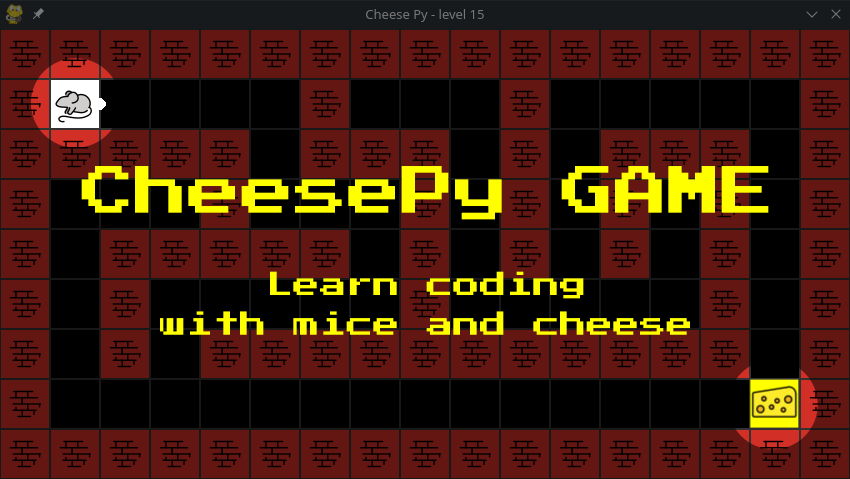
CheesePy is a maze-based game crafted to facilitate the understanding of fundamental principles in computer programming.
Players navigate a mouse through various challenges, each level increasing in difficulty from basic to more advanced. They provide Python code to direct the mouse's actions.
Through conquering these levels, you will grasp essential programming concepts like conditions (if-else), loops (while/for), functions, and language syntax.
Once installed, the game will run completely offline.
Install
Install Python 3 on your system, if you haven't already.
From a terminal window, install cheesepy game with the following command:
pip install cheesepy_game
- Check that the install went well by running this commmand:
python -m cheesepy_game
If you do not get any error message, it means everything went fine and the game is installed in your system. You can safely delete the downlaoded and extracted files and folders.
WARNING: in some cases you might need to use pip3 and python3 in the previous commands instead of pip and python.
Quickstart
To start the game, open your code editor (for example using IDLE). Then create a new python file, paste the following code into it and run it.
from cheesepy_game import start_game, Buddy
# set the Mouse name
Buddy.set_name("Sarah")

start_game()
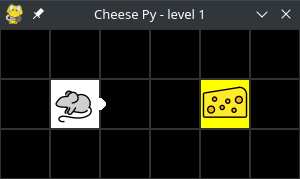
A window will pop-up showing the first puzzle. If you have a look at the printed output you will see something like this:
    Game started! You are playing level 1. Good luck, Sarah!
    Get the cheese.
As the game says, You have to Get the cheese. Move around using the keyboard arrow keys, but keep an eye on what is printed in the terminal window, you will see messages like these:
Game started! You are playing level 1. Good luck, Sarah!
Get the cheese.
>>> New position: (x:2, y:1)
>>> New position: (x:3, y:1)
>>> New position: (x:4, y:1)
Once you are on the cheese press 'G' (grab) and read the messages:
>>> Got cheese!
OK, This is what you need to do to pass this level. Now try with code only!
That is it, this is exactly what you need to do to complete this level. But if you want to get to the next level you need to solve this one with code. Let's see.
In order to get the cheese, the mouse has to move 3 times to the right to get on the cheese, then grab it. You can achieve this behavior with the code here belo. Delete the prevous code and copy-paste the following:
from cheesepy_game import start_game, Buddy

# set the Mouse name
Buddy.set_name("Sarah")

def solution():
    # this is your solution to the puzzle in the current level
    # These are your instructions for the mouse what to do to solve it.
    Buddy.move_east()
    Buddy.move_east()
    Buddy.move_east()
    Buddy.take_item()

    # start the game with the solution
start_game(solution)
Here, Buddy represents the mouse, and the function solution contains the actions Buddy needs to do to solve the puzzle.
At this point, when the game window pops up, press SPACE, and you will see the mouse doing exactly what you said. When the mouse stops, if the solution was correct, the mouse background turns green and the game will print a message like this:
GAME OVER
Congrats Sarah, You solved level 1!
Your password for level 2 is d099e9d7
(press Q to quit.)
Congratulatons! You can close the game window now to end the game.
Next level
Since you won level 1, you got a password to play level 2: d099e9d7
All you need to do is pass the password to the start_game function, like this:
start_game(solution, password="d099e9d7")
Hint you can use Buddy.set_speed() to increese the speed of the mouse.
And now you have a new puzzle to solve, have fun!
Keyboard
You can move the mouse using the keyboard. Navigate through the puzzle, and try your solutions. However, advancement to the subsequent level requires solving it solely with code."
Here is a list of keys and their respective mouse actions:
Arrow keys: move the mouse 1 step in the arrow directionF: move the mouse 1 step forward (in the direction of the white bump)R: rotate the mouse direction 90 degrees to the rightL: rotate the mouse direction 90 degrees to the leftG: grab the item in the current mouse cell (if any)D: drop the currently carried item (if any)
Credits
CheesePy is developed and maintained by Prof. Marco Pascucci @ The american University of Paris
The game is developed with pygame.
Special thanks to the developers of the labirinth-py for sharing this very qualitative and well written package, used in cheesepygame to generate mazes.
Start one level of CheesePy.
Parameters:
solution: a user defined function with the instructions to solve the current levelpassword: a string to access the corresponding level.
When you complete one level, you will get a password to access the following. Notice that the password is linked to your Mouse's name, so if you change your name, the password will change too.
Player's interface to control the mouse movement.
Set wether the mouse should display messages about its actions or not.
Drop the item the mouse is carrying.
If the mouse is carrying an item, the item will be dropped on the cell currently occupied by the mouse.
Return True if the game is over. The game is over when the mouse completes the level or if the Game window gets closed.
This function can be useful to create loops that do not end untill the level is solved:
while not Buddy.game_over():
    Buddy.move_forward()
Tf you put this loop in your solution, the mouse will try to move forward untill it solves the level or until you close the game window.
Return a string describing what item the mouse is carrying now. If the mouse is not carrying anything, return an empty string.
Return the coordinates of the mouse at the current time.
The coordinates are returned as a tuple of two integers (x,y) representing the x and y coordinate of the mouse. The coordinates (0,0) represent the top left tail of the maze.
Set the player name. The level passwords are generated using the player's name, if you change name the passwords will not work.
Set the player's movement speed as movements-per-second.
The minimum speed it 1, the maximum speed is 200.